
Dub Mode arrived in Choicer Voicer 0.5.0. It records your takes against a video supplied by a dub pack, then replays the finished scene. Use version 0.5 or newer, place a valid pack in packs_voice, and confirm that it includes dub_video.ogv plus timing metadata.
Trusted starting points
Open the official and community resources used for this answer.
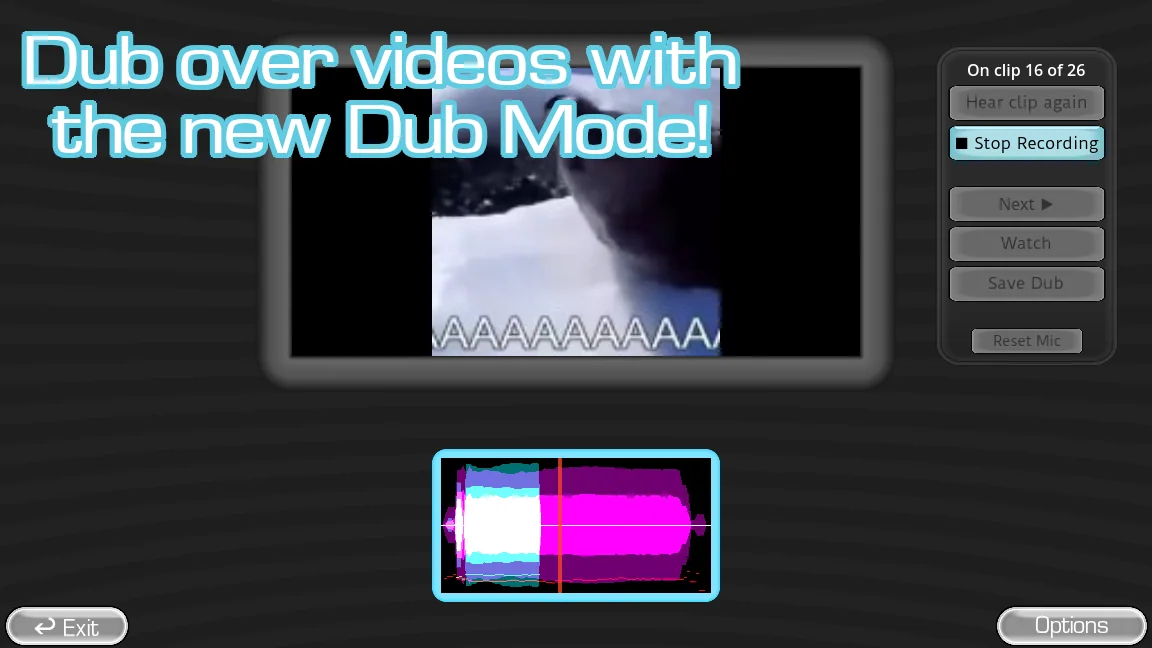
How to access Dub Mode and load a dub pack
Dub Mode was added in version 0.5.0. If you cannot find it, first confirm that you are launching a 0.5.x build rather than an older 0.4.14 copy. A normal voice pack can still play regular prompts, but a Dub Mode scene needs the extra video and synchronization data supplied by a valid dub pack.
Official documentation places dub packs inside the game's packs_voice folder, which can be opened from the main menu. A working pack needs an OGV video named dub_video.ogv and timestamp metadata for its audio samples. Use the source links above for the current format and community pack catalog.
- Check the version shown by the official build and use version 0.5.0 or newer.
- Open the game files from the main menu and locate the packs_voice folder.
- Extract one complete dub-pack folder without flattening or renaming its files.
- Restart the game and check the voice-pack screen for the pack or a load error.
- Open Dub Mode with that pack and complete one short scene before adding more content.
How Dub Mode differs from a standard round
A standard voice-pack round centers on imitating a source line and receiving a judgment inside the game-show format. Dub Mode adds video timing and context, so the recorded performance is funny not only as a sound but as dialogue attached to a scene.
That extra visual layer changes what makes a good prompt. Short scenes with clear speakers, readable action, and enough room for a new performance are easier to understand than long clips with dense music or rapid cuts.
| Element | Standard voice round | Dub Mode |
|---|---|---|
| Primary source | A voice line | A video scene |
| Player challenge | Imitate a prompt | Record dialogue for the scene |
| Custom content | Voice pack | Dub pack |
| Technical pressure | Microphone and playback | Microphone, playback, video decoding, and timing |
Prepare the room and run a clean first round
Use headphones or keep speakers low so the clip does not leak into the microphone. Test one default or known-good dub pack before loading a community collection, and make sure the video plays smoothly at the display resolution you plan to use.
Tell players whether they should closely imitate the scene or invent new dialogue. Both can be fun, but a shared rule keeps the first round from becoming confusing.
- Choose one short dub pack and play its source video before recording.
- Check microphone level with headphones connected and leave a small pause at each end.
- Record one concise take, then watch it in context before changing settings.
- Add more clips only after video playback, capture, and output remain stable.
Choose or create better dub content
Use the current official dub-pack guide to understand the required media and metadata. Community videos can show the creative possibilities, but their upload date and entertainment focus do not make them the format authority for the latest build.
For public distribution, use video and audio you created or have permission to share. Do not assume a short clip is automatically safe to bundle, and include clear credits plus content warnings in the pack readme.
Watch a practical example
Long-form gameplay showing how video dubbing changes the normal judged-round format. The player is deferred until you choose to load YouTube.
Common questions
Why can't I find Dub Mode in Choicer Voicer?
Confirm that you are launching version 0.5.0 or newer, then test with a valid dub pack in packs_voice. Older 0.4.x builds predate Dub Mode, and ordinary voice packs may not include the required video and timing data.
What is Dub Mode in Choicer Voicer?
It is a video-oriented mode where player recordings are presented against scenes supplied by dub content, changing the normal voice-line format into a dubbing performance.
Where can I download Choicer Voicer dub packs?
The community pack archive has a dedicated dub-pack catalog. Use the official dub-pack documentation to check authorship, version support, OGV video, timing metadata, and folder structure before installing.
Sources
- Dub Content PacksYeahMaybe
- Version 0.5.0 ReleasedYeahMaybe on itch.io
- The Choicer Voicer: The Video Dubbing UpdateVinesauce: The Full Sauce on YouTube
- The Choicer Voicer by YeahMaybeYeahMaybe on itch.io
- The Choicer Voicer PacksChoicerVoicer.com
Keep going
How to Make a Choicer Voicer Dub Pack
Create a Choicer Voicer dub pack with legally usable video, concise scenes, consistent encoding, current metadata, credits, and a clean testing workflow.
Read guideHow to Play The Choicer Voicer
Learn the basic Choicer Voicer round, microphone flow, judging, local player setup, and the fastest way to start without spoiling the joke.
Read guideHow to Customize The Choicer Voicer
Plan a cohesive Choicer Voicer setup by combining contestant, voice, judge, studio, chatter, and dub packs without turning the install into a conflict.
Read guide